2026-09-30
Email signatures need consistency, but they also need a personal touch.
Marketing wants every signature to follow the corporate design. IT wants a manageable and secure solution. Employees may want to add information that is relevant to their role, region, audience, or personal communication style.
The usual answer is to send every change request to an administrator.
But what if users could maintain selected signature information themselves, without gaining control over the signature template and without sending their data to another external service?
With Set-OutlookSignatures, you can build exactly that kind of self-service model using data sources that are already part of your trusted environment.
🔗Central control does not have to mean zero flexibility
Most information in an email signature comes from a directory such as Active Directory or Microsoft Entra ID:
- Name
- Job title
- Department
- Company
- Telephone number
- Office location
- Email address
These are centrally managed attributes, and for good reason. They represent official company information and should usually remain under organizational control.
However, not every useful signature attribute belongs in a central directory.
Consider information such as:
- A profile photo
- Pronouns
- A translated or customer-facing job title
- Working hours or availability
- Academic or professional titles
- A personal slogan
- A booking link
- Links to approved personal social media profiles
- A preferred signature language
- A preferred design selected from an approved set
- Preferences for optional signature elements
These attributes may be personal, optional, regional, or relevant only to email signatures. Maintaining all of them centrally can create unnecessary work for IT, HR, and Marketing.
Letting users maintain selected values themselves removes that bottleneck.
The important part is deciding where this information is stored and who remains in control of it.
🔗Keep signature data in systems you already trust
Some email signature solutions provide their own hosted portals or attribute stores for user-specific information.
That can be convenient, but it also introduces another system that may process or store employee data. Depending on your regulatory, contractual, and internal security requirements, this can mean additional questions about data location, access, retention, subprocessors, and compliance.
Set-OutlookSignatures takes a different approach.
It can work with data from sources controlled by your organization. Instead of transferring signature attributes to an additional provider-hosted database, you can store them in your existing environment and make them available to your signature process.
This enables three important principles:
- Self-service for employees
- Governance for IT and Marketing
- Data sovereignty by design
There is no requirement for an additional external data processor just to store a profile image, translated job title, preferred design, or signature language.
User-maintained signature attributes can be stored in many places. Organizations often use identity management systems, HR platforms, employee portals, databases, Microsoft Entra ID extensions, or SharePoint lists. The best choice depends on existing governance and ownership models.
🔗SharePoint is one practical self-service option
A SharePoint list is a practical option for collecting user-maintained signature attributes.
Its key advantage is simple but important: it already provides a graphical user interface.
Users can open the list in a browser and maintain their permitted information without PowerShell, administrative tools, or access to the signature templates themselves. Most organizations using Microsoft 365 already have the necessary platform, authentication, and access controls in place.
A list could contain fields such as:
| Field | Example |
|---|---|
| User | alex@example.com |
| Profile photo | User-uploaded image |
| Preferred job title | Senior Customer Advisor |
| German job title | Senior-Kundenberater |
| Pronouns | he/him |
| Personal slogan | Making technology easier |
| Booking link | Approved scheduling URL |
| Social profile | Approved LinkedIn profile |
| Signature language | English |
| Preferred design | Corporate Modern |
Marketing defines which choices are available and how the values appear in the signature.
IT defines access, integration, validation, and lifecycle rules.
Users maintain only the information that has been delegated to them.
🔗Self-service does not mean unrestricted access
A self-service list should not become an ungoverned collection of public employee data.
SharePoint permissions and list settings can be configured so users can create and edit only their own entries. Depending on the intended process, access can also be designed so users see only their own information.
Additional rules or lightweight automation can ensure that each user has only one active entry.
This creates a controlled model in which:
- Users cannot edit another employee's information
- Users do not need access to signature templates
- Users cannot introduce unapproved designs
- Marketing can provide predefined choices
- IT retains control over permissions and data processing
- Optional attributes remain optional
- Sensitive fields can be excluded entirely
Choice fields are particularly useful for options such as signature language, design, social networks, or optional modules. They give employees flexibility while preventing unexpected values.
Free-text fields, URLs, and uploaded photos may require additional governance. Depending on your organization, this can include validation, moderation, approval, file-type restrictions, or clear user guidance.
The goal is not to allow users to build their own signatures. The goal is to let them personalize approved parts of centrally managed signatures.
🔗Marketing keeps control of the brand
This approach does not move signature design into the hands of employees.
Marketing can still define:
- Corporate layouts
- Fonts and colors
- Logo placement
- Required contact information
- Approved design variants
- Available languages
- Rules for optional elements
- Campaign banners
- Legal text and disclaimers
A user might choose between "Classic" and "Compact," but both designs remain approved templates.
A user might select German or English, but Marketing controls the wording and layout of both versions.
A user might add a LinkedIn profile, but the template determines where the icon appears, how it is formatted, and whether it is displayed at all.
Personalization happens inside clearly defined boundaries.
🔗SharePoint is one option, not a requirement
A SharePoint list is attractive because it combines storage, authentication, permissions, and a familiar browser-based interface.
However, Set-OutlookSignatures does not force you to use a specific attribute portal or data store.
Depending on your existing architecture, signature-related attributes could also come from:
- Active Directory
- Microsoft Entra ID
- Exchange custom attributes
- HR systems
- Identity management systems
- Databases
- Existing employee portals
- Other organization-controlled data sources
The best source depends on who owns the data, how often it changes, who should maintain it, and which governance processes already exist.
For example, official job titles may remain in your HR system, telephone numbers may come from Entra ID, and personal signature preferences may be stored in SharePoint.
Set-OutlookSignatures can bring these elements together when generating the signature.
🔗Connect self-service with identity management
A SharePoint list does not have to remain an isolated data source.
With a small amount of automation, selected values can be synchronized with attributes in Microsoft Entra ID or another directory. This can be useful when the same information is required by multiple applications.
Organizations with an identity management system can integrate the list into their existing identity lifecycle processes instead. This is often the easier option when user provisioning, attribute ownership, validation, and deprovisioning are already centrally managed.
The principle remains the same:
- Users maintain only the fields assigned to them
- Authoritative systems remain authoritative
- Approved data can flow to the systems that need it
- The organization controls the entire process
Not every attribute needs to be synchronized. Signature-only preferences can remain in the SharePoint list if there is no reason to store them elsewhere.
🔗A practical division of responsibilities
A successful self-service model starts with clear ownership.
🔗IT
IT provides the technical framework:
- Access controls
- Data source integration
- Validation and automation
- Identity mapping
- Monitoring
- Data retention
- Signature deployment
🔗Marketing or Communications
Marketing controls the brand experience:
- Templates
- Approved designs
- Available languages
- Formatting rules
- Optional elements
- Campaign content
- User guidance
🔗Employees
Employees maintain selected personal preferences:
- Preferred language
- Approved profile image
- Translated job title
- Pronouns
- Personal links
- Optional signature elements
This reduces routine administrative work without weakening central control.
🔗Privacy-first personalization
Employee-related signature attributes can be personal data. Even apparently harmless information such as a photo, pronouns, social profile, or working hours deserves appropriate handling.
A privacy-first design should therefore consider:
- Data minimization
- Clear purpose and ownership
- Optional versus mandatory fields
- Appropriate access permissions
- Validation of externally visible information
- Retention and deletion processes
- Removal of data when an employee leaves
- Transparency about where the information will appear
Keeping the data in your trusted environment does not remove the need for governance. It makes governance easier because you can apply the controls, policies, and processes your organization already uses.
Instead of adding another external platform, another attribute database, and another data-processing relationship, you can build on your existing Microsoft 365, directory, or identity management environment.
🔗Give users freedom without giving up control
Email signature management does not have to be a choice between rigid central administration and uncontrolled user-created signatures.
With Set-OutlookSignatures, organizations can combine:
- Centralized templates
- Consistent branding
- User-maintained attributes
- Controlled design choices
- Existing identity processes
- Organization-owned data sources
- No additional external data processor
- Data sovereignty by design
A SharePoint list is one straightforward way to add a user-friendly interface. Other trusted data sources can be used just as well.
The result is a practical balance: employees can personalize relevant parts of their signatures, Marketing protects the brand, and IT remains in control of architecture, permissions, and data.
🔗SharePoint Implementation example
The following example shows how to create and use a new replacement variable named $CurrentUserPersonalSlogan$ based on a SharePoint list.
🔗IT
Create a SharePoint list. Our example users the Mailbox field of type User/Group to uniquely identify a mailbox - with this, you can, for example, make all entries viewable for everyone but only grant edit rights to each user's own item.
To populate the placeholder variable $CurrentUserPersonalSlogan$ in Set-OutlookSigantures for use in templates, simply create a custom replacement variable file as described in .\config\default replacement variables.ps1 and add custom code.
Click here for sample code
# Url of the SharePoint list
# Make sure the Entra ID app used for Set-OutlookSignatures has read access (Sites.Read.All or Sites.Selected, delegated)
$SharePointListUrl = [uri]'https://example.sharepoint.com/sites/Signatures/Lists/UserSpecificAttributes'
$SharePointListLookupField = 'Mailbox'

try {
    # Extract Graph query components from Url
    $SharePointListSite = "$($SharePointListUrl.Host):$($SharePointListUrl.AbsolutePath -replace '/Lists/.*$', ''):"
    $SharePointListList = ($SharePointListUrl.AbsolutePath -split '/Lists/')[1]

    # Set headers to allow queries against non-indexed list fields
    $SharePointHeaders = $(if ($SimulateUser -and $SimulateAndDeployGraphCredentialFile) { $script:AppAuthorizationHeader.Clone() } else { $script:AuthorizationHeader.Clone() })

    $SharePointHeaders['Prefer'] = 'HonorNonIndexedQueriesWarningMayFailRandomly'

    # Get SharePoint user lookup id for current user
    $SharePointUserListId = ((GraphGenericQuery GET "https://graph.microsoft.com/v1.0/sites/$($SharePointListSite)/lists?`$select=id,name,system&`$top=999").result.value | Where-Object name -EQ 'users' | Select-Object -First 1).id
    $SharePointUserId = (GraphGenericQuery GET "https://graph.microsoft.com/v1.0/sites/$($SharePointListSite)/lists/$($SharePointUserListId)/items?`$filter=fields/EMail eq '$($ReplaceHash['$CurrentUserMail$'])'&`$select=id&`$top=1" -authHeader $SharePointHeaders).result.value[0].id

    # Get filtered SharePoint list content
    $SharePointListListResults = GraphGenericQuery GET "https://graph.microsoft.com/v1.0/sites/$($SharePointListSite)/lists/$($SharePointListList)/items?`$filter=fields/$($SharePointListLookupField)LookupId eq '$($SharePointUserId)'&`$expand=fields&`$top=1" -authHeader $SharePointHeaders

    # Set replacement variable $CurrentUserPersonalSlogan$
    $ReplaceHash['$CurrentUserPersonalSlogan$'] = "$($SharePointListListResults.result[0].value[0].fields.PersonalSlogan)"
} catch {
    $ReplaceHash['$CurrentUserPersonalSlogan$'] = ''
}🔗Marketing
Simply use the replacement variable $CurrentUserPersonalSlogan$ in your templates.
🔗Users
Users can update their personal slogan any time by simply navigating to https://example.sharepoint.com/sites/Signatures/Lists/UserSpecificAttributes.
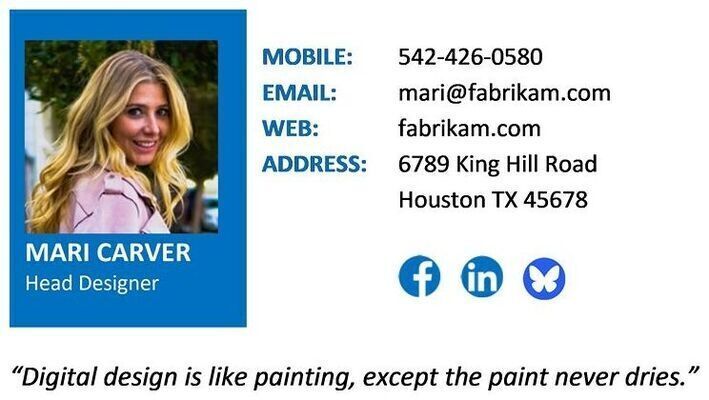
Mari Carver, Fabrikam's Head Designer, has defined a personal slogan for use in her signature:
🔗Set-OutlookSignatures centralizes email signatures and out-of-office replies across every Outlook platform
Consistent branding for Marketing, centralized control for IT, and zero manual effort for employees. Sovereign by design, it keeps data within systems you already trust.
| ⚡ 3-Step Quickstart | 🎯 Book Interactive Demo | 🔍 Website |
|---|---|---|
| For IT Administrators and Technical Evaluation. No Signup Required. | For Executives and Decision-Makers from IT, Marketing, and Security. | Features, architecture, documentation, and downloads. |